Sony Interactive Entertainment
Accessibility engineering, automation, and platform migration for PlayStation experiences.
Software Development Engineer in Test (Contract) • 2025 - 2026
During my apprenticeship at Sony Interactive Entertainment, I worked on accessibility validation, automation, and regression confidence for PlayStation experiences as they migrated to a new platform architecture. My work focused on helping teams ship accessible, reliable user experiences while collaborating closely with developers, designers, and product teams.
Overview
I contributed to accessibility quality across multiple PlayStation user experiences during a large-scale migration from legacy components to a new platform architecture. My work combined accessibility analysis, automation, exploratory testing, and cross-functional collaboration to identify issues before release and improve confidence in customer-facing experiences.
My Role
My responsibilities included:
- Validating accessibility across migrated PlayStation experiences
- Building Python and Selenium automation to reduce repetitive regression testing
- Investigating accessibility regressions using screen readers and assistive technologies
- Collaborating with developers to reproduce, prioritize, and verify fixes
- Integrating automated validation into Jenkins pipelines
- Exploring AI - assisted workflows for accessibility review and documentation
Technical Highlights
I improved validation coverage across 12+ PlayStation user experiences, identified 8 customer-facing issues, and surfaced 3 high-priority accessibility defects with ADA implications. I designed automation that helped teams catch regressions earlier and explored an AI proof of concept for accelerating accessibility checks.
- Improved accessibility validation across 12+ PlayStation experiences
- Identified 8 customer-facing accessibility defects
- Reported 3 high-priority issues with European Accessibility Act (EAA) implications
- Built Python/Selenium automation that reduced repetitive manual validation
- Created automated screen-reader validation workflows using transcript analysis
- Explored an AI proof of concept for accelerating accessibility review
Technologies
- Python
- Selenium
- Pytest
- Jenkins
- Screen readers
- Accessibility testing tools
- AI-assisted workflows
Challenges
Platform migration meant that interfaces, components, and behaviors were continuously evolving. Accessibility defects often involved interactions between application code, assistive technologies, and platform behavior, requiring careful investigation and clear communication with multiple engineering teams.
What I've Learned
This experience reinforced how much I enjoy improving user experiences through engineering. I found the most rewarding work involved understanding how real users interact with interfaces, collaborating across disciplines, and solving problems that directly improve usability and accessibility. It also clarified where I want to continue growing. While automation was an important part of my role, I'm most energized by building interactive frontend experiences where performance, accessibility, and thoughtful design come together.
Prototype workflow
Making screen-reader automation understandable
Raw automation logs made it difficult to distinguish passing and failing checks, locate the relevant interaction, or understand why a failure occurred. This proof of concept turned that output into a visually scannable dashboard, connecting each assertion to its recorded interaction, transcript, and structured test data for faster debugging and triangulation.
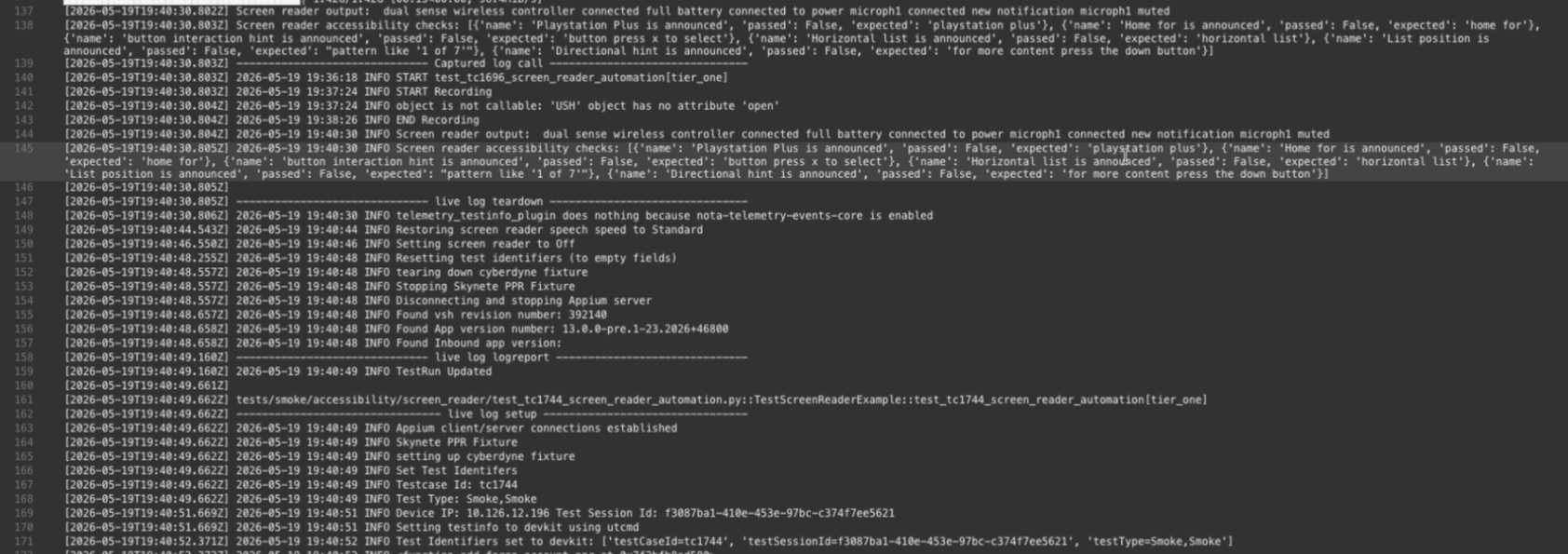
Define the problem in the raw logs
The automation output contained the necessary evidence, but it was buried in dense, interleaved logs. Engineers had to search across timestamps, screen-reader output, expected values, and boolean results to determine what passed, what failed, where it failed, and why.
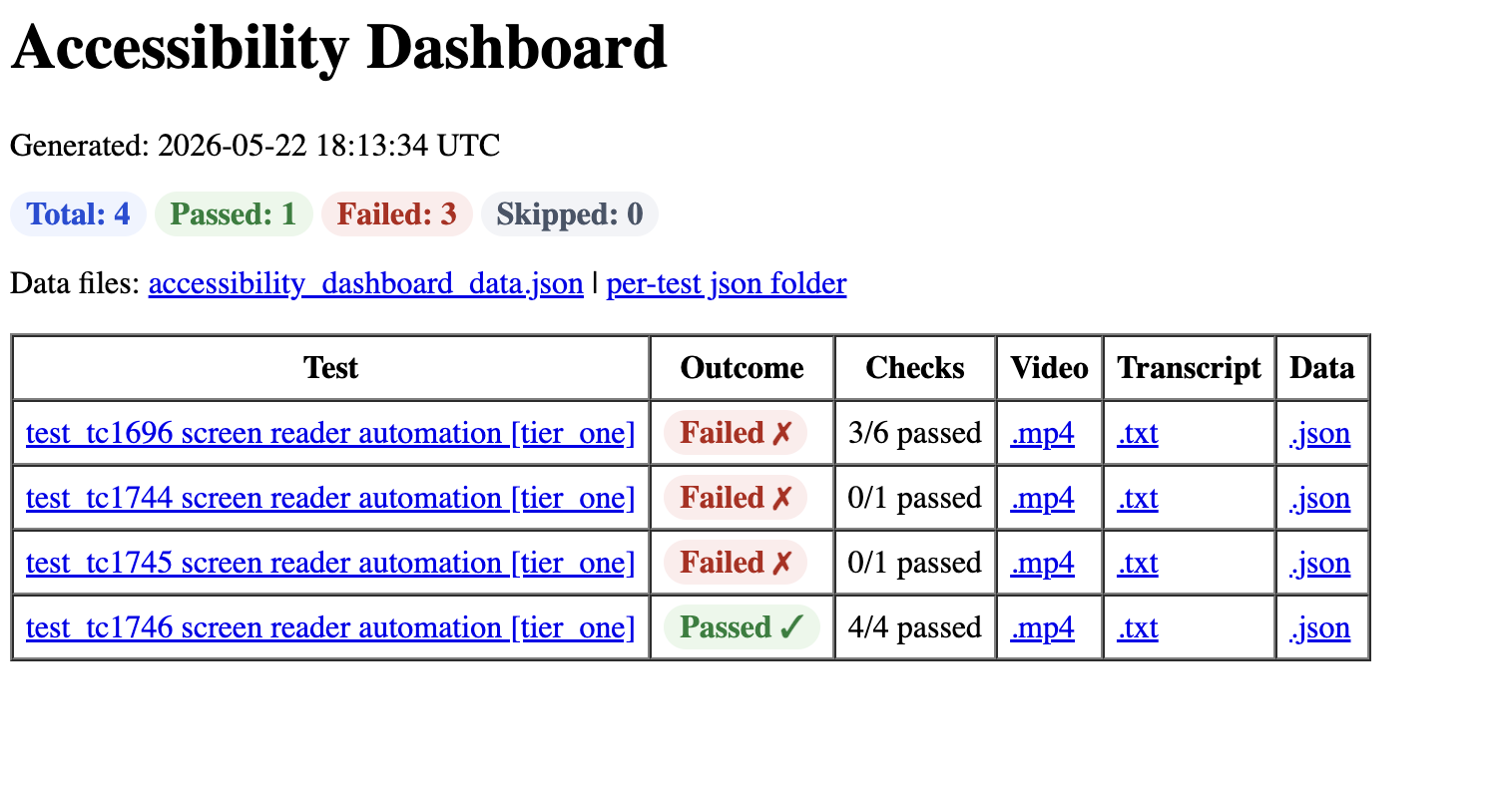
Aggregate automated results
The dashboard turns screen-reader automation output into a scannable test summary, with pass and failure totals plus direct links to each test’s evidence.
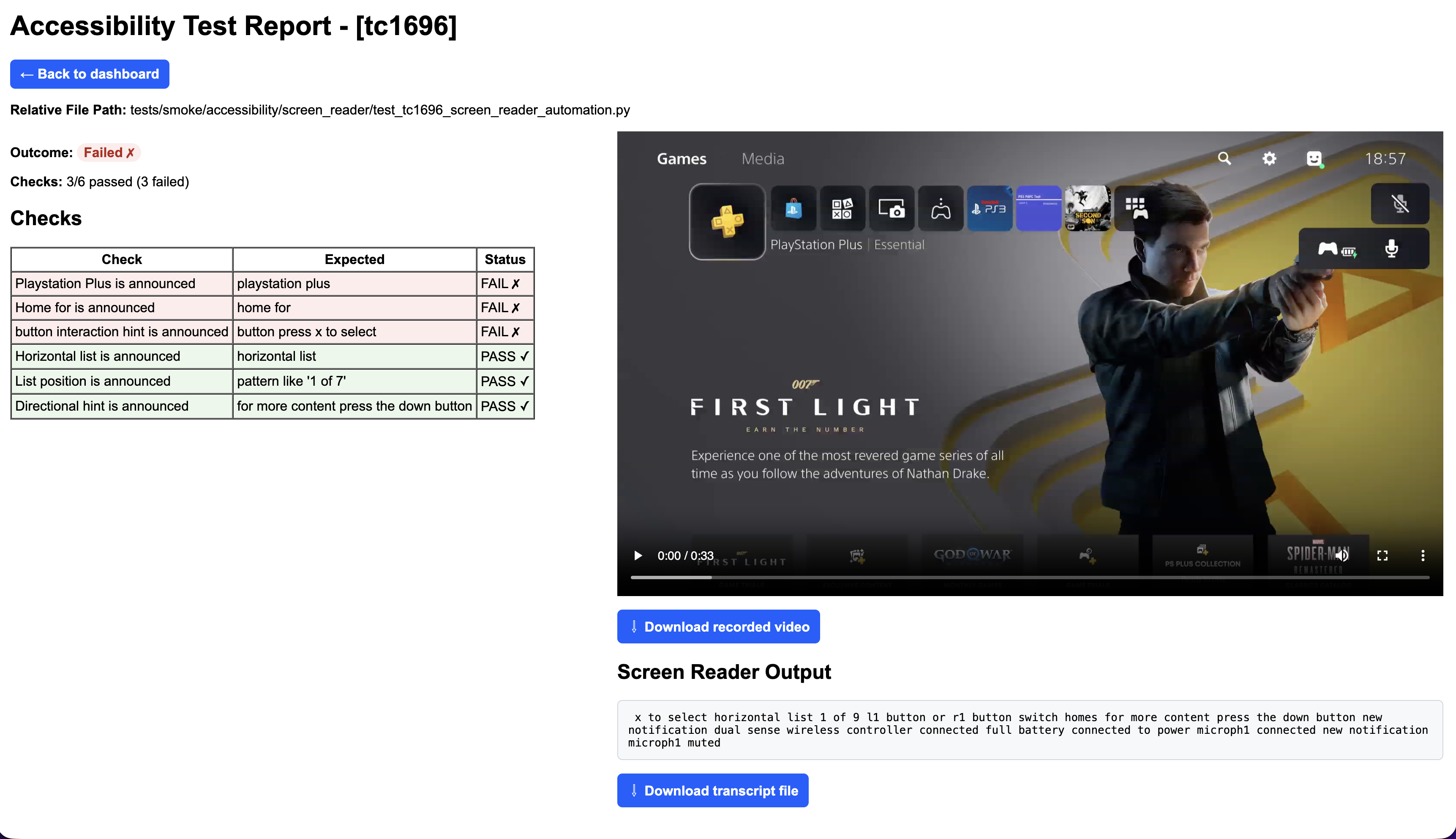
Investigate failures with evidence
A per-test report connects expected announcements to pass/fail checks, recorded video, and the captured screen-reader transcript so engineers can reproduce a regression quickly.
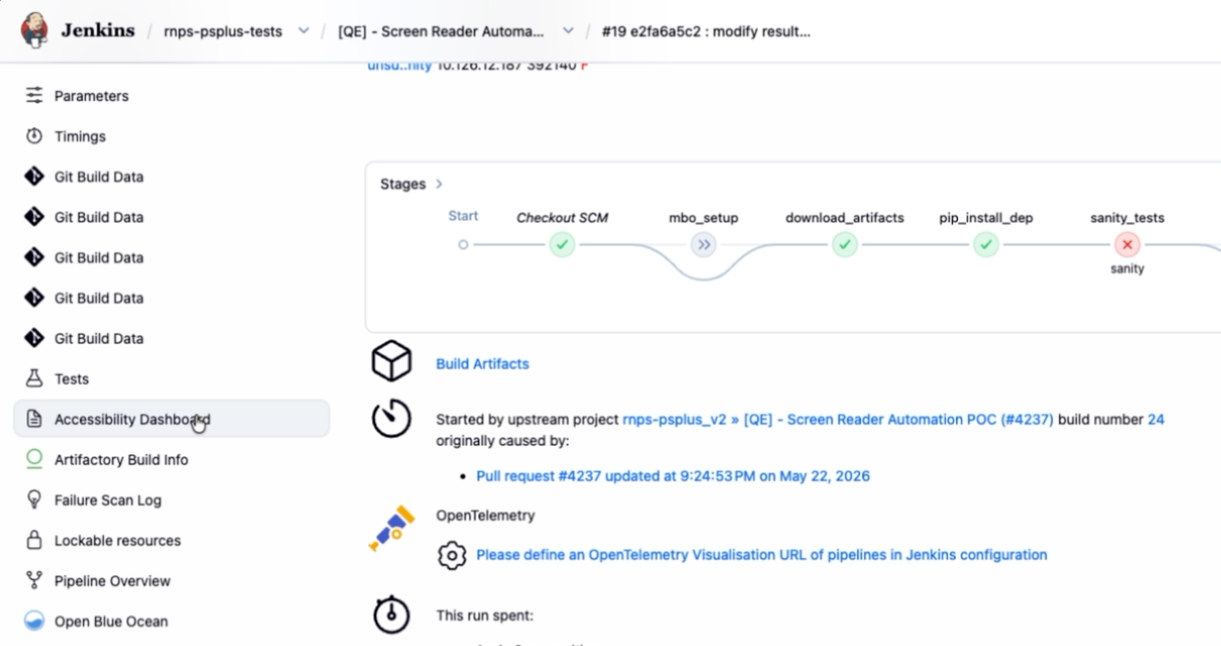
Publish results through CI
The generated dashboard is attached to the Jenkins build as an accessible artifact, keeping diagnostic output connected to the pull request and test run that produced it.
Verify the fix
The final report shows all six expected screen-reader announcements passing while retaining the video and transcript needed for human review.
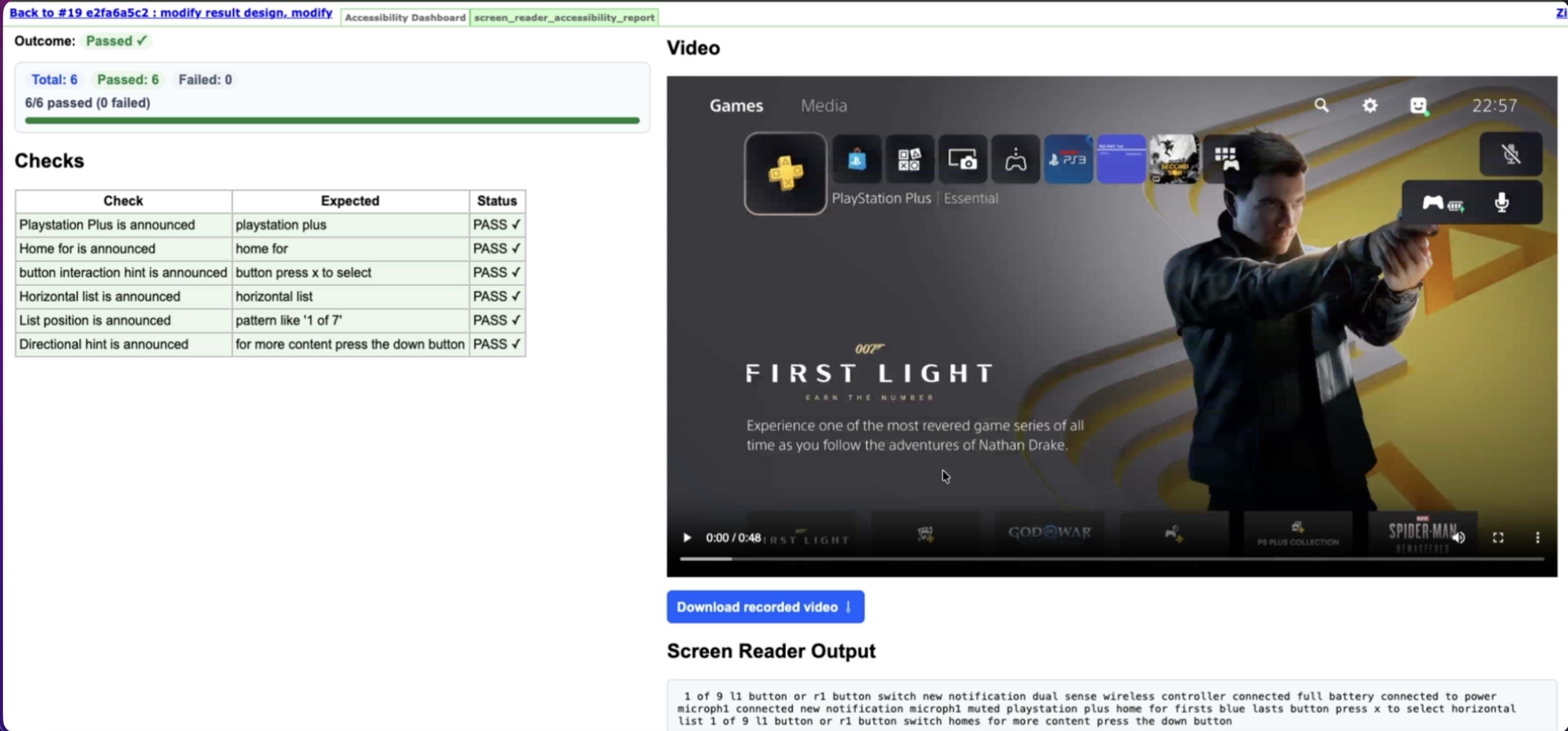
Evidence
Video, transcript, and structured JSON remain linked to each result.
Diagnosis
Scannable pass/fail checks connect expected announcements to captured output so engineers can locate and triangulate issues faster.
CI visibility
Reports travel with the Jenkins build instead of living in raw logs.
Interview Q&A
Tell me about the accessibility work.
I validated accessibility across PlayStation experiences during a platform migration, focusing on screen reader behavior, focus management, navigation, and usability. I partnered with developers to reproduce issues, prioritize fixes, and verify improvements before release.I helped validate accessibility across PlayStation user experiences during a platform migration, identifying issues that affected keyboard navigation, screen reader behavior, and customer-facing usability. The work required both technical testing and clear prioritization because some defects had meaningful ADA implications.
Tell me about the AI proof of concept.
I explored how AI could assist accessibility validation by organizing test results, analyzing screen reader transcripts, and helping reviewers identify potential accessibility issues more efficiently. The goal wasn't to replace manual testing, but to reduce repetitive work and improve review speed.
What was technically challenging?
During migration, both legacy and new implementations existed simultaneously, making regression validation more complex. Automation had to remain reliable even as interfaces evolved, requiring a balance between stability, flexibility, and meaningful accessibility coverage.
What would you improve today?
I would push accessibility further upstream by providing reusable accessibility patterns, automated checks, and developer guidance before implementation begins. Catching accessibility issues during development is significantly faster—and less expensive—than finding them during validation.